Friday, November 13, 2015

Redhen Train and Peronne Steam during Port Festival


Last month I took the rare opportunity to ride a Red Hen from Adelaide Railway Station to the National Railway Museum (former Port Dock Railway Station).


Since I was at Adelaide Railway Station (I took a bunch of photos in my older blog post here), I took the opportunity to take some updated photos around the station and platforms:


Once beyond the ticket gates, I took some photos of the platform area and some 3000 series trains running regular Adelaide Metro services.


Touchscreen Information board in the platform area inside the ticket gate:


Platform 4 - an Belair line train waiting to depart:


Platform 6 - an Outer Harbor line train waiting to depart:


Platform 8 and 9 - a Gawler line train waiting to depart:


With the retirement this year of the 2000 series Diesel trains that were commonly used on the Gawler line, the 3000 series trains that used to run on the Seaford line are being used on the Gawler line instead so the 2000 series trains could be retired from service.


The Seaford line is now electrified and using new Electric trains now all delivered in 2015. There is the occasional 3000 series service still, but not very often.


Arriving into Platform 9 following the Gawler line train departure is the RedHen diesel train. These used to run on the Adelaide Metro before the 2000 and 3000 series trains were brought into service.


Closer view of the front:


People quickly scrabbled onto the train for seats!


Inside the RedHen train as the crowds flocked in:


Inside the Redhen train shortly after departure from Adelaide Railway Station:


The Red Hen trains don't have any air conditioning, so the windows open, allowing photos to be taken easily out the window!


The Red Hen journey goes directly from Adelaide Railway Station to National Railway Museum without any intermediate stops, which I guess makes it the fastest way to get to Port Adelaide!

We arrived into Jacketts station, within the National Railway museum:


The Red Hen trips were very popular and it was great to see so many people riding it. The National Railway Museum was open for free on this particular weekend, so lots of people took the opportunity to enjoy the museum!


Jacketts station platform sign:


Bub was on steam train duties at the museum, taking people on a railway trip around the museum grounds:


Closeup of Bub waiting as the passengers got on board for the next trip:


View of the train tracks around the museum, with the former Woodville signal cabin in the background:


Inside the museum building I noticed these interesting pig additions:


The former Adelaide Railway station clock is also now in the museum, and it is the first time I have seen it since it was moved here:


Classic trains from the past in the museum:


Outside though, as a special treat for this particular weekend, Peronne (a Steam Locomotive) was doing trips from the Railway museum to the Aircraft museum during the day:


Here is Peronne watering up as Bub passes by:


Closeup of Peronne taking on more water before it's next run:


I had a great day out, with plenty of train action! This event was part of the Port Festival, and I also spent some time in the port enjoying some of the other activities on that day!


Wednesday, November 11, 2015

Lariad on X1000

Today I wanted to take a look at the recently released game called Lariade (Lariad), ported by HunoPPC to run under AmigaOS 4.1 Final edition, demonstrated on my AmigaOne X1000.


Lariad is a platform/adventure game with multiple environments to explore using a spaceship to go between them, with tasks and clues dotted throughout the game to move forward and unlock more environments and challenges.

I should mentioned that I am not sure if this game works on non-Warp3D hardware, as I have Warp3D Southern Islands drivers and compatible card on my X1000. A lot of HunoPPC games need it. You can also try Wazp3D from os4depot.net if you don't have Warp3D on your X1000.

If you don't have Warp3D Southern Islands and suitable graphics card yet, I strongly recommend it! You can get Warp3D Southern Islands from AMIStore, and the compatible Radeon HD graphics cards are listed on the product page. The card that came with your X1000 is not compatible with Warp3D Southern Islands. You can also buy a compatible card direct from AmigaKit here (once they are back in stock again) or source one locally from Ebay...

It is free to download Lariad and it is available on os4depot.net here. Once extracted to a drawer you get the following:


The OS4 ready doesn't contain much information other than version changes, but it included here anyway:


Below is the Lariad title screen - still not sure if this game is called Lariade or Lariad. I'll go with Lariad as that is what the game icon says!


Controls are listed under the Config option:


When you select Start, you are prompted to select the difficulty level:


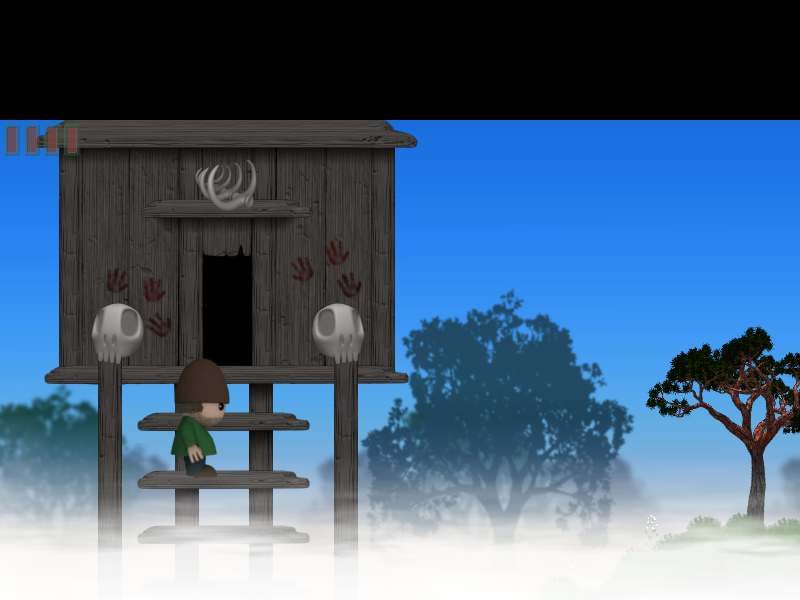
As the game opens you are in a hut in a swamp area:


As you move around the hut you can interact with some objects and go through doors of course.


Control is via joystick or keyboard. I am using the keyboard:


Heading outside the hut we see the rather pretty swamp environment, ready to explore:


Instructions are given out to explain what things do, what can kill you and so on:


You start with 3 health bars on the top left, and once they are exhausted it is game over.


Exploring the level I quickly found the ladder leading to the medial power up that gives your player once more additional health bar. There is one of these on each level:


Heading back down again...


I have to say, this game is very pretty and very engaging. The story and music are good and sucked me into the game:


Look out for the spiders you can jump up and down platforms to avoid walking in front of them.


I then find the witches hut that allows me to save my progress - I can continue from this point if I am killed - without saving I have to start from the beginning, so make sure you do save when you reach one of these points!


Soon after I reached my spaceship, which means I have reached the end of the swamp environment.


Once inside the spaceship I can save the game and also recharge my health fully:


Moving into the heart of the ship I can see the following screen, which allows me to launch the spaceship to the next environment. I can only go to environments that are unlocked. You can use the computer keyboard to switch which environment you want to travel to next.


The screen on the left confirms the current environment the ship is at right now.  Pushing the red launch button takes us to the next environment select with the keyboard on the right side of the screen.

On arrival we wake up from bed on the spaceship, ready to explore:


We can see the view of the Waterfall environment outside:


Once exiting the Spaceship we are into the Waterfall environment:


There are plenty of warnings about falling objects and bamboo to avoid walking on:


There is a side cave after the bridge which I explore:


In the side cave is a guy called Gisaku who explains the birds are all gone, and another guy went looking for them and lost his gun in here somewhere...


So somewhere in the environment is a gun we need to find! Working through the level I avoid the various traps and falling objects:


I reached the next save point:


I then found the gun in an adjacent room, and the next environment is also unlocked:


Definitely we need the gun to fight our way through many enemies to get back to the spaceship!


Eventually I made it back to the spaceship, to then launch for the next environment - cliffs:


The Cliff environment is harder than the previous one, and I guess it only gets harder still as you progress through the game!


Ready to catch a lift to the higher platforms:


We apparently need to find some tools:


Unfortunately shortly after this I was killed by some aggressive enemies!


Lariad is a great game and a lot of fun to play on the X1000. The sound, music and graphics are great and the adventure is quite interesting! Recommended.